Dependency management in Node.js

Dependency management is one of the most important long-term responsibilities in Node.js development, yet it is often overlooked during the early stages of a project. You initialize the repository, install a handful of dependencies, and jump straight into building features. The application grows, customers start using it, and the project begins to deliver real value.
Months later, you run npm audit and discover a wall of warnings:
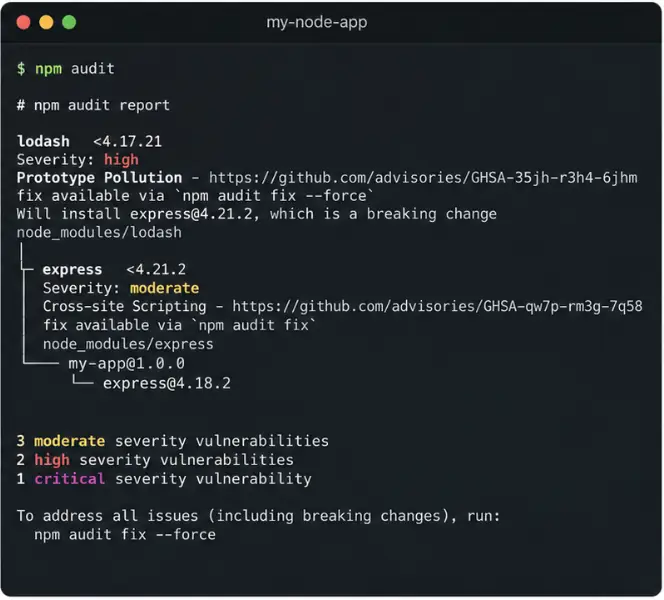
- 3 Moderate vulnerabilities
- 2 High vulnerabilities
- 1 Critical vulnerability
No problem, you think. Time to upgrade.
You update a few packages, rerun the audit, and expect a clean bill of health.
Instead, the report is still full of findings.
Some vulnerabilities disappeared. Others remain buried several levels deep in transitive dependencies. A few are attached to packages you don't even use directly. Meanwhile, npm outdated reports dozens of packages behind the latest version.
At this point, the question is no longer "Which packages should I upgrade?"
The real question is:
How do I manage dependencies as a long-term engineering responsibility?
This article introduces a mental model for dependency management in Node.js projects. The goal is not to provide a step-by-step upgrade strategy, but rather a framework for thinking about dependency risk and maintenance over the lifetime of an application.
Dependency management is risk management
Many teams treat dependency management as a security problem. In reality, security is only one dimension of the problem.
A useful mental model is to think about dependencies across three separate risk categories:
Security risk
This is the most visible category because tools such as npm audit surface it directly.
Questions to ask include:
- Does a known vulnerability exist?
- Is the vulnerable code reachable by my application?
- Is the vulnerability exploitable in my deployment context?
- Is there an available fix?
Not every vulnerability represents the same level of risk. A critical vulnerability in an unused code path may be less urgent than a moderate vulnerability in a heavily exposed part of your application.
It's also worth remembering that security risk is not limited to publicly disclosed CVEs. The JavaScript ecosystem has experienced supply chain attacks involving compromised maintainers, malicious package updates, typosquatting, and dependency confusion attacks. Understanding what software enters your dependency tree is just as important as monitoring vulnerability reports.
Maintenance risk
A package can be secure today and still become a problem tomorrow.
Questions to ask include:
- Is the package actively maintained?
- Are maintainers responding to issues, bug reports, and security concerns?
- Does the project have multiple maintainers or a single maintainer?
Dependencies that are effectively abandoned increase operational risk because future security fixes, compatibility updates, and bug fixes may never arrive.
Lifecycle and support risk
Dependencies exist within larger ecosystems.
Questions to ask include:
- Is the package compatible with currently supported Node.js versions?
- Is it tied to frameworks or libraries approaching end-of-life?
- Does it still receive security patches?
- Is the project moving toward deprecation?
A package may be maintained yet still represent risk if it depends on technologies that are themselves leaving support.
One important consequence of this model is that latest version is not itself a meaningful objective. A dependency can be several versions behind and still present an acceptable level of risk. Conversely, a dependency can be fully up to date and still introduce security, maintenance, or support concerns.
Direct vs transitive dependencies
One of the unique challenges of the Node.js ecosystem is the sheer size of dependency trees.
You may install only a few dozen packages directly, but your application can easily end up running hundreds or even thousands of transitive dependencies. These are packages that your dependencies depend on.
This is why vulnerability management often feels confusing. The vulnerable package reported by npm audit may not be something you installed yourself. It may be several levels deep in the dependency graph and only reachable through another package.
Understanding that your application consists of both direct and transitive dependencies is essential when evaluating risk and planning upgrades.
Runtime vs development dependencies
Not all dependencies carry the same operational risk.
A vulnerability in a package that ships with your production application deserves more scrutiny than a vulnerability in a development tool that only runs on a developer workstation or CI server.
This does not mean development dependencies can be ignored, but it does mean they should be evaluated differently.
When assessing dependency risk, always start by determining whether the package is part of your production runtime.
Why dependency management feels different in Node.js
Engineers coming from ecosystems such as Java are often surprised by how aggressively the Node.js ecosystem evolves.
Historically, enterprise Java environments often emphasized long support cycles and conservative upgrade policies. The Node.js ecosystem has generally favored faster release cycles and more frequent library churn.
New major versions appear frequently, frameworks evolve rapidly, and package maintainers often focus their efforts on the latest releases.
This creates a temptation to continuously chase the newest versions of everything.
In practice, dependency management should not be driven by a desire to be fully up to date.
The objective is to maintain an acceptable level of risk while preserving application stability.
The core tools
Several npm tools provide useful signals.
npm audit
npm audit identifies known vulnerabilities in your dependency tree.
It answers:
"Are there publicly known security issues affecting my dependencies?"
It does not answer:
"Does my application actually use the vulnerable code path?"
npm outdated
npm outdated shows which packages are behind the latest available versions.
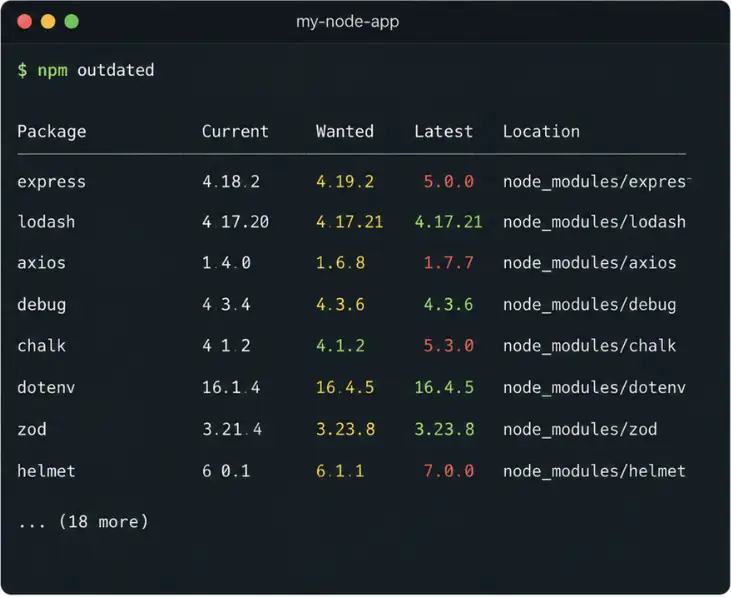
It answers:
"What newer versions exist?"
It does not answer:
"Should I upgrade?"
npm sbom
npm sbom generates a Software Bill of Materials (SBOM), which provides a complete inventory of the components used by your application.
This inventory becomes especially valuable when integrating with external security, compliance, or supply chain analysis tools. It also gives you a machine-readable representation of what is actually present in your application, including transitive dependencies.
How AI can support dependency management
AI assistants are increasingly useful in dependency management, but not because they replace engineering judgment.
A reasonable approach is to keep dependency changes under explicit human control. Installing or upgrading packages typically requires little effort, while the consequences of an incorrect change can be significant.
For that reason, AI is often most valuable as an advisor rather than an operator.
The most useful use cases involve helping engineers answer questions such as:
- Is this vulnerability actually reachable from my application?
- Is the vulnerable functionality used at runtime?
- Does an exploit require conditions that don't exist in my environment?
- Is this package actively maintained?
- What is the upgrade path and expected migration effort?
- Which dependencies deserve immediate attention versus monitoring?
In other words, AI can help transform raw dependency data into actionable engineering decisions.
What it should not do is blindly recommend upgrading everything to the latest version, nor should it be given full responsibility for modifying your dependency tree without review.
A conservative strategy wins
A common mistake is treating dependency management as a race to eliminate every warning and reach the newest version of every package.
A better approach is usually more conservative.
Focus on understanding risk before making changes. Prioritize meaningful upgrades. Preserve stability. Avoid introducing breaking changes without a clear benefit.
Dependency management is not about maximizing version numbers.
It's about understanding risk, making deliberate trade-offs, and maintaining a software system that remains secure, supportable, and stable over time.

Full-stack JavaScript developer working across NestJS, React, and Angular, with Python in the mix when a project calls for it. He keeps an eye on new technologies as they emerge, bringing that curiosity into how he builds and ships products.